These pages are generated from the project's internal documentation. References to source files and binary offsets are kept as provenance — so you can see where each claim comes from — but they are not followable yet: the engine is not published. Once it is, they will become links.
3 · Experience improvements
Touch controls, tapping the map to walk, save slots, Spanish, and the scrollable log.
All five points are confirmed against the code, not inferred. At the end of the document there is a section on what was checked and how. There is also a removed improvement and a live defect found today that were not part of the brief.
1 · Tapping the map to walk
✨ ADDED · Code: game/src/ui/autowalk.ts, game/src/core/world/pathfind.ts, skin/fiel/skin.ts (intent emission)
Before
Arrow keys, one step per press. Without a keyboard — that is, on a phone — you were left with the D-pad on the button deck, one tap per tile.
Now
You tap a cell in the viewport and the party walks there. One step every 140 ms, following the path computed by A* (findPath) over the active map and respecting the means of transport (on foot, horse, carpet, skiff, ship: the same transport the engine uses).
The design decision that makes it safe
Every step goes through game.move(dir) and applyEvents — exactly the same path as an arrow-key press. There is no parallel route that teleports, and no shortcut that skips the turn's events. That is the difference between "a convenience" and "a second implementation of movement that drifts out of sync".
And it is cancelled by:
- any manual command,
- combat (finding R1 of the work lane: walking on your own during combat was precisely what nobody wanted),
- a map change,
- and
"Blocked!"— if the path is cut halfway, the walk stops.
Trade-offs
- The step is a fixed 140 ms. It does not speed up on long journeys. Crossing Britannia by tapping the edge of the viewport is slow on purpose: every step is a game turn, with its encounters and its clock.
- No path, nothing happens.
findPathreturnsnulland the function is a silent no-op: tapping a mountain gives no error message. That is discreet, but it is also indistinguishable from a tap that did not register. - It is quality of life, not fidelity. The original had no mouse. It is in the same bucket as the rest of this document.
2 · Touch controls: the deck
✨ ADDED · Code: game/src/ui/touch.ts (single source for the button deck), skin/portrait/deck-ancho.ts (CSS), deck-nativo.ts (behaviour)
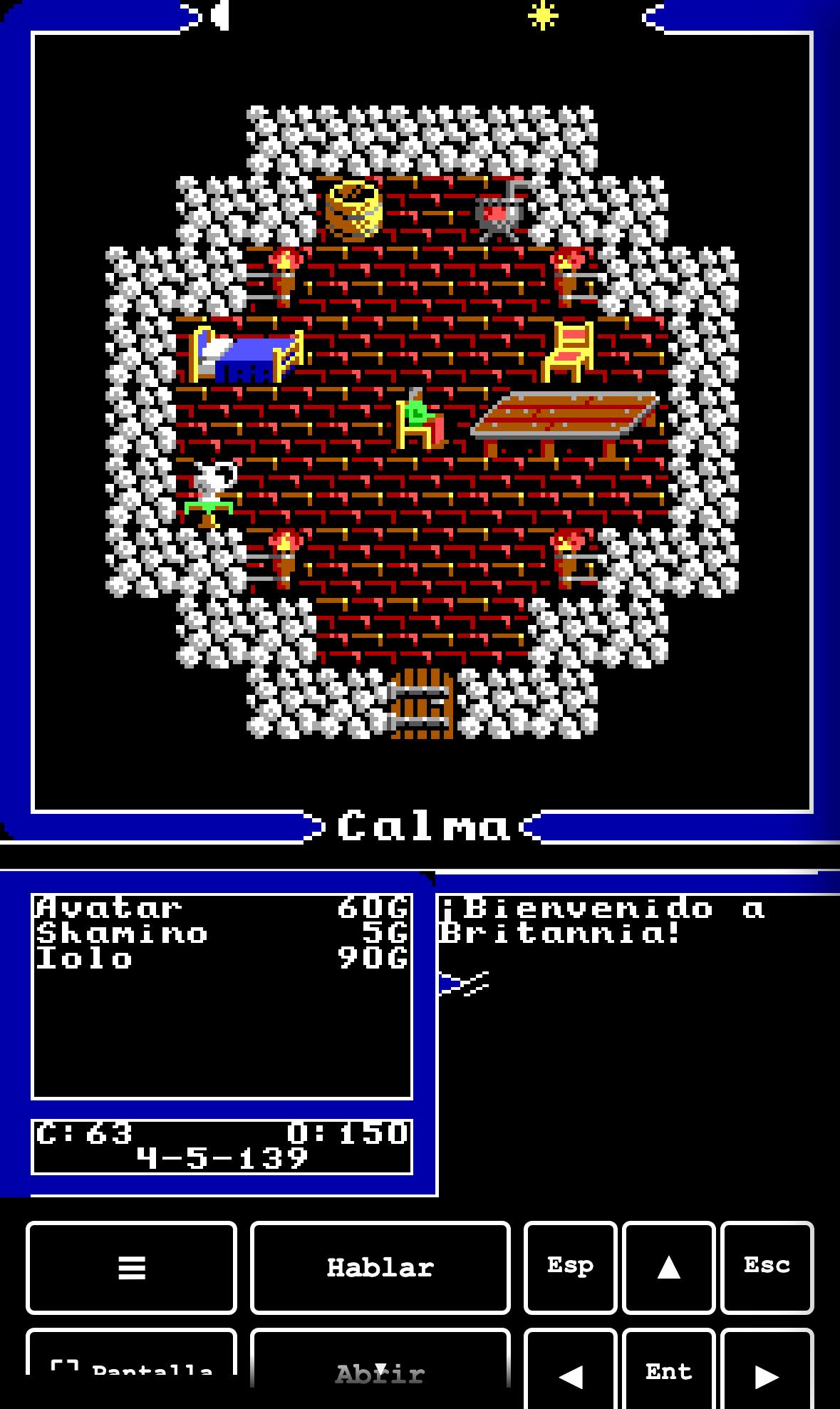
The deck appears when the pointer is coarse (pointer: coarse) — the pointer is measured, not the user agent. And that is not a criterion picked for this: it is the same predicate that brings up the split layout and that the skin uses to decide its mobile fit. Tying them guarantees that the split layout and the buttons that make it usable always appear together.
Buttons, counted live on 2026-08-04:
| Sheet | Buttons |
|---|---|
World (WORLD_BUTTONS) | 25 |
Utility (UTIL_BUTTONS) | 3 |
Dungeon (DUNGEON_BUTTONS) | 5 |
Combat (COMBAT_BUTTONS) | 2 |
The ☰ menu
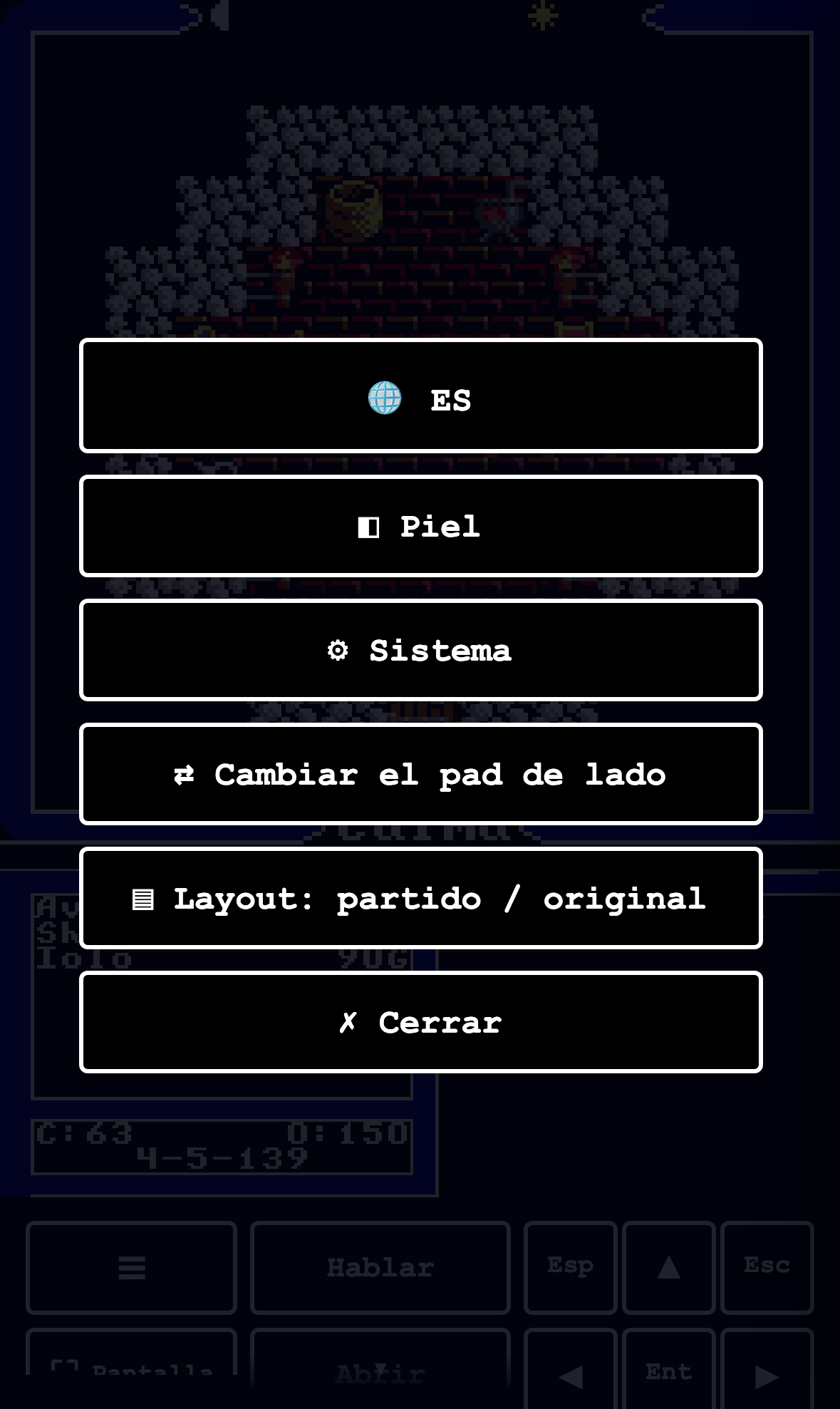
Six entries: ES (language) · Skin · System · Switch pad side · Layout: split / original · Close.
"Switch pad side" moves the D-pad between left and right; the default is right, "for right-handers" (deck-nativo.ts:ladoGuardado). And "Layout: split / original" is the ▤ discussed in 2 · Layouts §4.
The hint that there is more below
The ~14 commands below the fold were invisible: "it does not look like there is more". The solution is a chevron with a gradient on the relevant edge when there is content out of view (ui/scroll-hint.ts).
A detail that avoids a classic bug: both overlays carry pointer-events: none, so they never steal a tap. And the logic (scrollHintState) is pure, with a 2 px epsilon because scrollTop arrives with fractions when the DPR is not 1.
Trade-off: measuring the pointer also over-fires
Tying yourself to pointer: coarse is right — the user agent lies, and a bespoke criterion would leave the split layout without its buttons — but it has a cost worth knowing: a laptop with a touchscreen reports coarse. That user has a keyboard and a mouse, and still gets the deck and the split layout by default.
It is not a fault of the predicate: it is that "are there fingers?" and "is this a phone?" are not the same question, and only the first one can be measured. The way out exists and is one click away — the ▤ in the ☰ menu, or ⚙ → Video — and the preference beats the default in both directions, so whoever turns it off stays off. But the first launch on that machine looks like a phone.
3 · The census that was missing: five unreachable commands
✨ ADDED · Internal record: movil-cmds-acta (2026-07-28)
The user's question
"Is the ignite torch command in the mobile buttons? Do a review that we have all the commands in the button list."
How it was answered, which is the interesting part
Not with a list from memory, but by reading the real dispatcher: kernel_cmd_dispatch @0x3178, case by case, plus the jump table for 'F'..'L' at 0x3490. That gives the complete set of commands, not the one someone remembered.
Two non-commands fell out along the way: 'D' and 'W' print their own "D-What?"/"W-What?", and the default at 0x34d8 closes the table with "What?".
The result
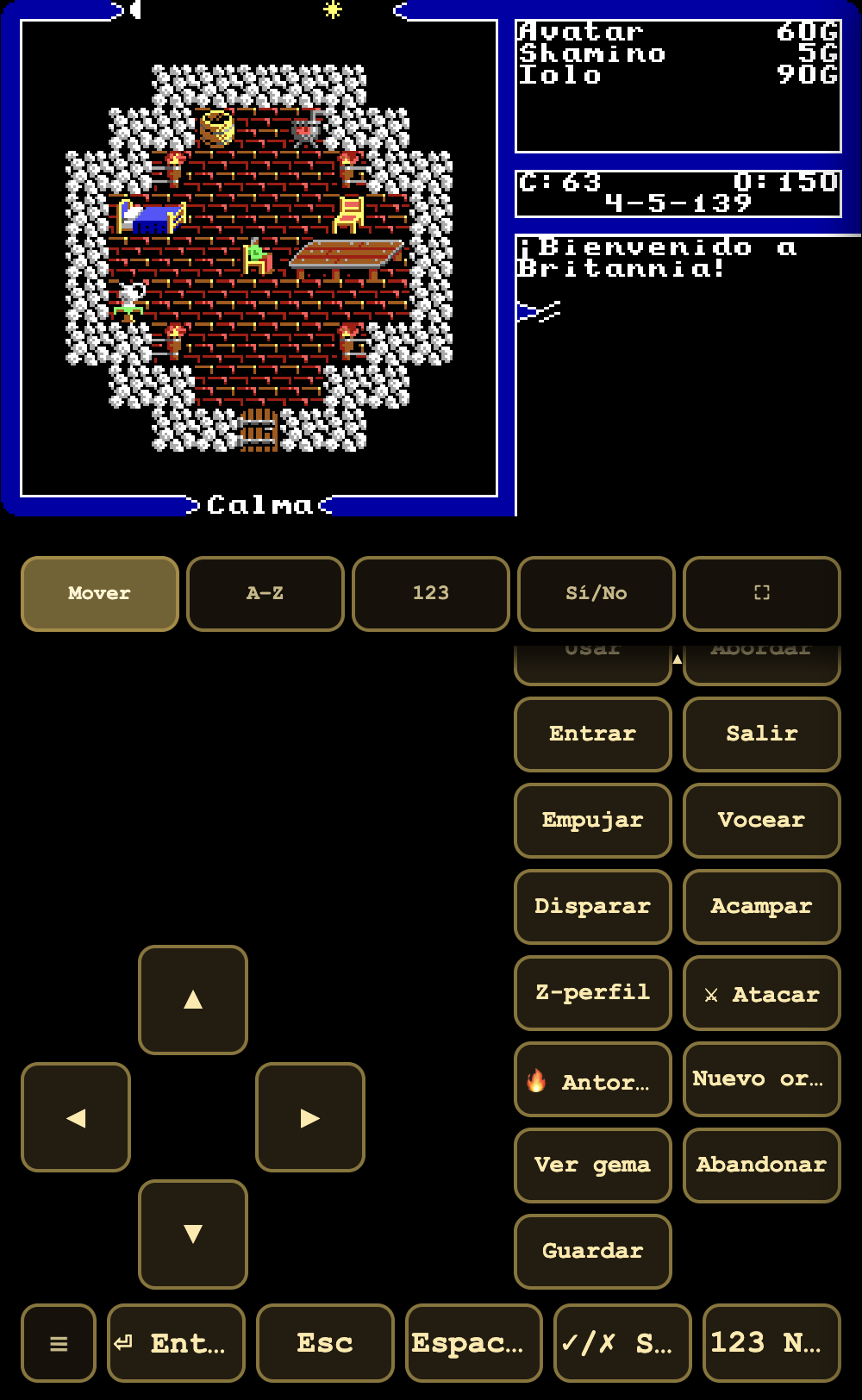
No, "Ignite torch" was not there: it existed only on the DUNGEON sheet. At night, out in the open, there was no way to light a torch without a physical keyboard. And four more were missing with it:
| Command | Key | Where it was |
|---|---|---|
| Attack | A | combat only — unreachable in town/overworld |
| Ignite torch | I | dungeon only — unreachable outdoors |
| New Order | N | nowhere |
| Quit & Save | Q | nowhere (the deck's "Save" is F5 = the multi-slot panel, not the faithful console flow) |
| View a gem | V | nowhere |
All five were added at the end of WORLD_BUTTONS, without reordering what the user already had memorised under their thumb. And they were added to a single table: the portrait and landscape decks consume it through TouchControls, they do not have their own copy.
Why it matters beyond the fix
Five commands out of twenty-five were out of reach for anyone without a keyboard, and the list had looked complete for a long time. What exposed it was not a review: it was comparing against the source of truth instead of against the memory of whoever wrote it.
Trade-off: the list no longer has a defensible order
Adding them at the end protects the muscle memory of people already using the deck — the reason it was done that way — but the price is that the grid stops having a logic a newcomer can follow. Attack and Ignite torch, among the most frequent commands, end up at the bottom, below the fold, behind Lend or Board.
It is the right choice for the users who were already there and the worst one for those arriving. Reordering the grid is a pending product change, not an oversight: the alternative was moving buttons out from under the thumb of someone who already had them placed.
And a presentation bug from the same lane
| before | after |
|---|---|
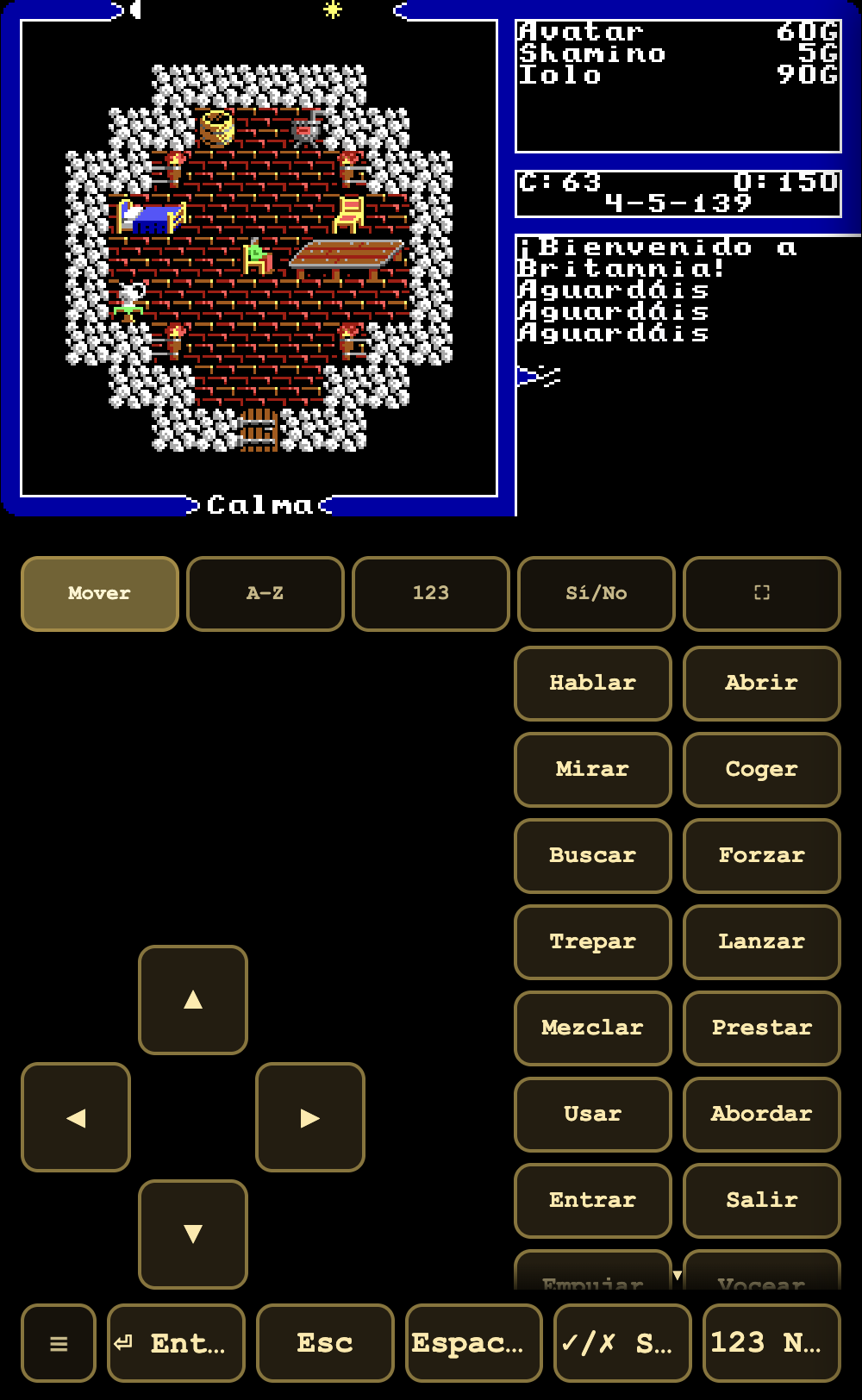 | 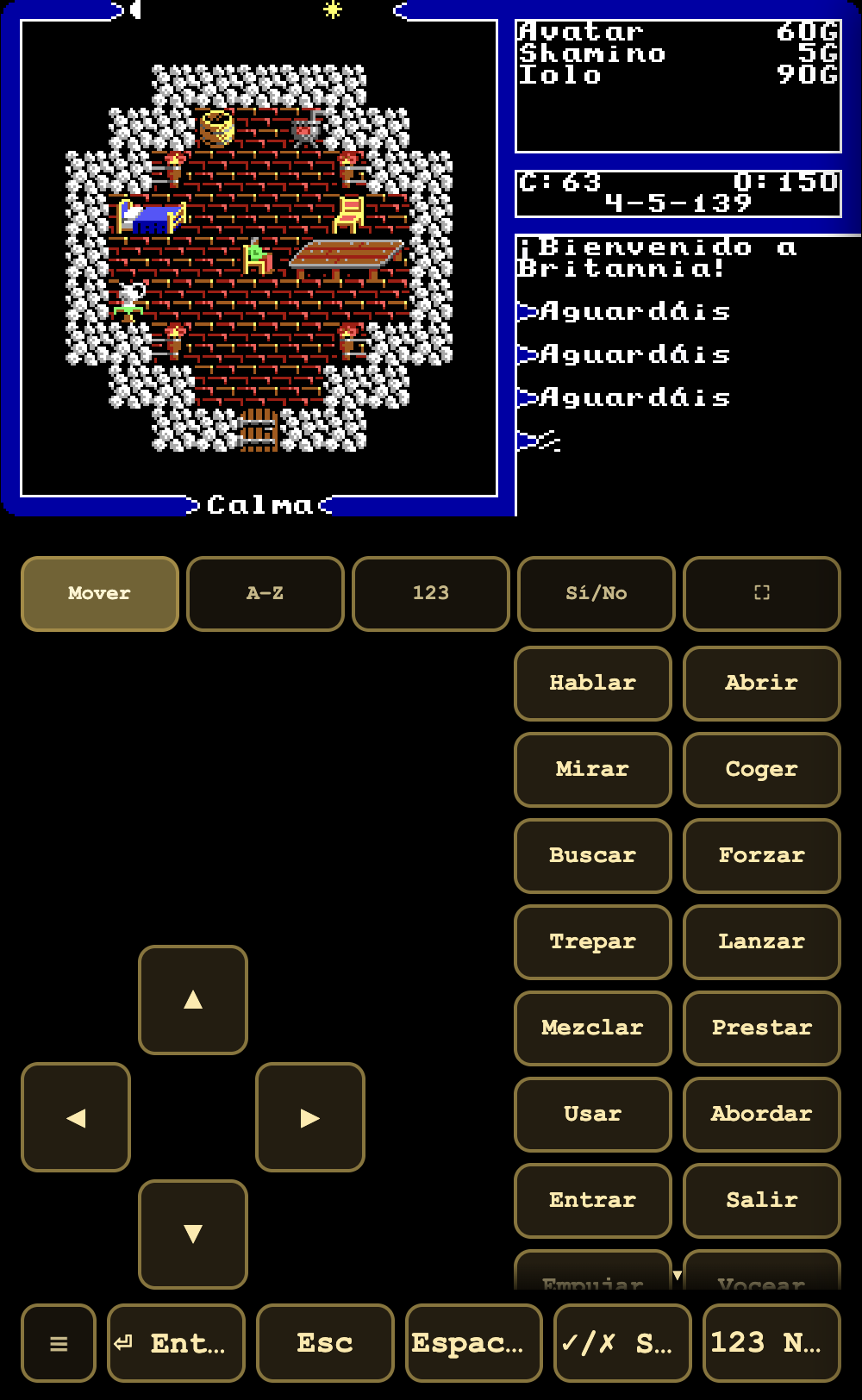 |
Pressing space, the original creates a log entry with its >; the port produced lines with no >, stuck to one another.
4 · The "on press" bug
✨ ADDED (fix to an addition) · Code: game/src/ui/tap-or-drag.ts, deck-nativo.ts
The problem
The deck's buttons fired their command on pointerdown: you rested your finger and it was already done, with no way to abort by sliding off. As soon as the command area became scrollable by touch, any attempted drag started on a button and fired the command underneath.
The fix
TapGate: pointerdown is recorded, pointermove is tracked, and the decision is made on pointerup. It is a tap only if the pointer moved no more than 10 px (Chebyshev distance). Ten pixels ≈ the Android/iOS touch slop: the natural tremor of a finger does not cancel the tap, a deliberate drag does.
And it covers the case people forget: when the browser keeps the gesture for its native pan, it emits pointercancel — the gate translates that to "it was not a tap".
The deliberate exception
The D-pad stays on pointerdown. Walking wants immediate response and repeat-on-hold; requiring pointerup would make movement feel spongy. Besides, the D-pad does not live in a scrollable area, which is where the problem came from. It is the only exception and it is written down as such.
And how it was done without touching ui/
An interceptor in the capture phase over the deck cuts pointerdown before it reaches the button, and the module puts its own trigger on pointerup. Zero lines modified in ui/touch.ts.
5 · Multiple save slots
✨ ADDED · Code: game/src/core/persistence.ts, ui/savepanel.ts · F5
Before
The original had a single SAVED.GAM. It is stated in the first line of the docstring of persistence.ts, and it is the reason the panel exists.
Now
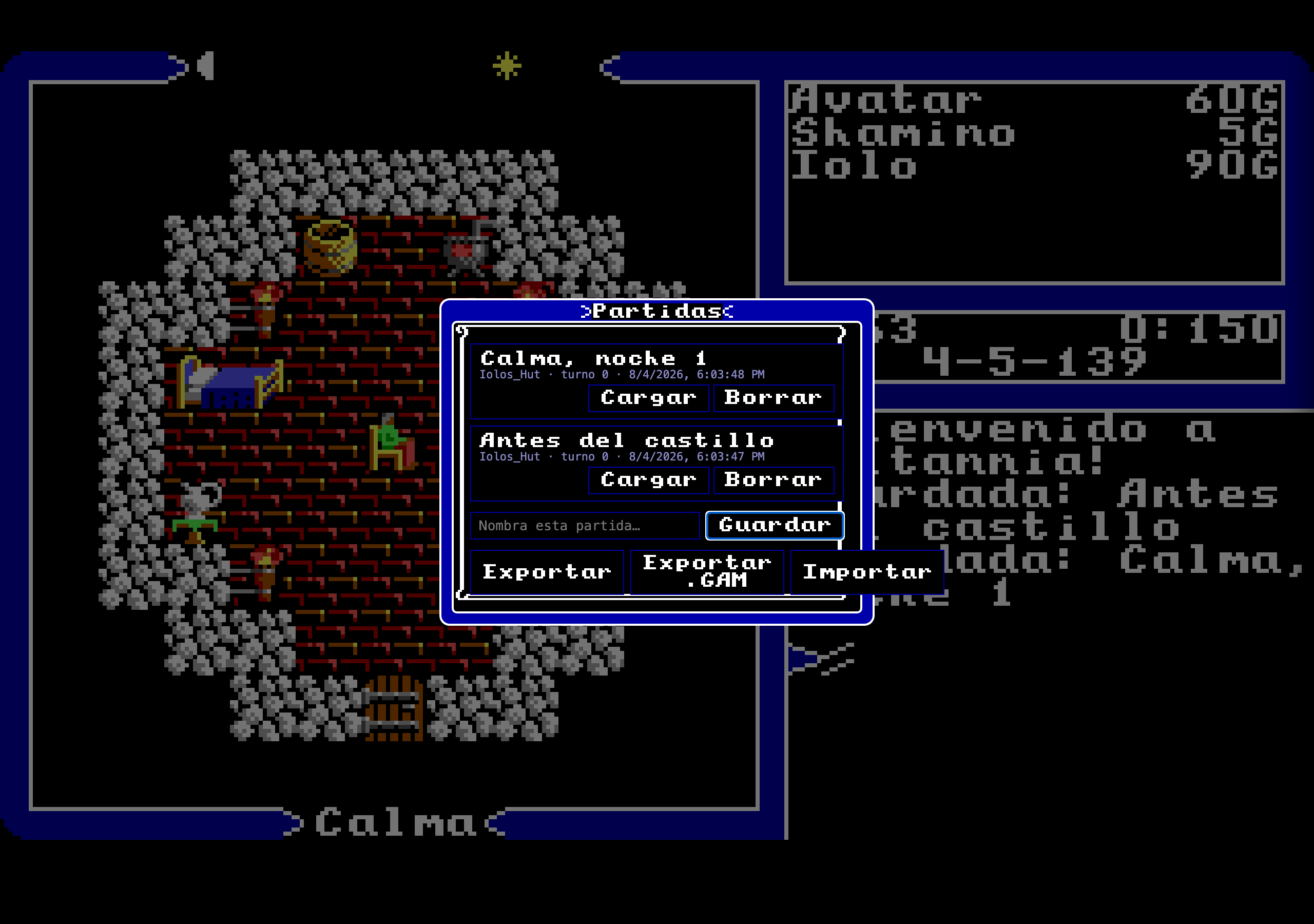
Named slots, unlimited, each with its place, its turn and its date, plus Load and Delete buttons. Below: name and Save, plus Export, Export .GAM and Import.
The four decisions behind it
localStorage, not OPFS. OPFS would be cleaner for large blobs, but its API is asynchronous and still uneven across browsers.localStorageis synchronous, universal and more than enough for a serialisedGameState.- A light index kept separately. The index lives in
u5clone:savesand each full save inu5clone:save:<id>, so that listing the slots does not force deserialising every state. - It never throws on a full quota. The soak test found that an uncaught
QuotaExceededErrorin the boot autosave left the game half-initialised — a boot zombie. NowsaveGamereturns{ok:false, reason:"quota"}and the caller decides: a message to the user on a manual save, silence and a log on the autosave. - A rotating 3-slot autosave (
autosave-1/2/3, round-robin) so one autosave does not overwrite the previous one.
The bridge back to the original, which is the elegant part
"Journey Onward" still works. The original's title menu reloads SAVED.GAM verbatim; here SAVED.GAM = the slot with the highest timestamp, whether an autosave or a manual save. With none, it starts a new game — just like the default SAVED.GAM that shipped on the disk. The multi-slot feature is added without breaking the 1988 flow.
Exporting in the 1988 format
"Export .GAM" produces a SAVED.GAM + SAVED.OOL + sidecar in the original disk format, from a 4192-byte template. You can take a game out of the port and — in principle — carry it to the real game.
Trade-offs
localStoragecan be cleared without warning, and an app installed to the home screen starts with its own storage partition: browser saves do not travel to it. (That same mechanism is what made the user see "the old version" when installing the port on their iPhone — see 2 · Layouts §4.)- The native
.GAMdepends on two asset templates. Ifinit.oolis missing, it exports with zeroed blocks: declared degradation, not a silent failure.
6 · Spanish
✨ ADDED · Code: game/src/i18n/ · Switched live with the 🌐 / ES button
| Spanish | English |
|---|---|
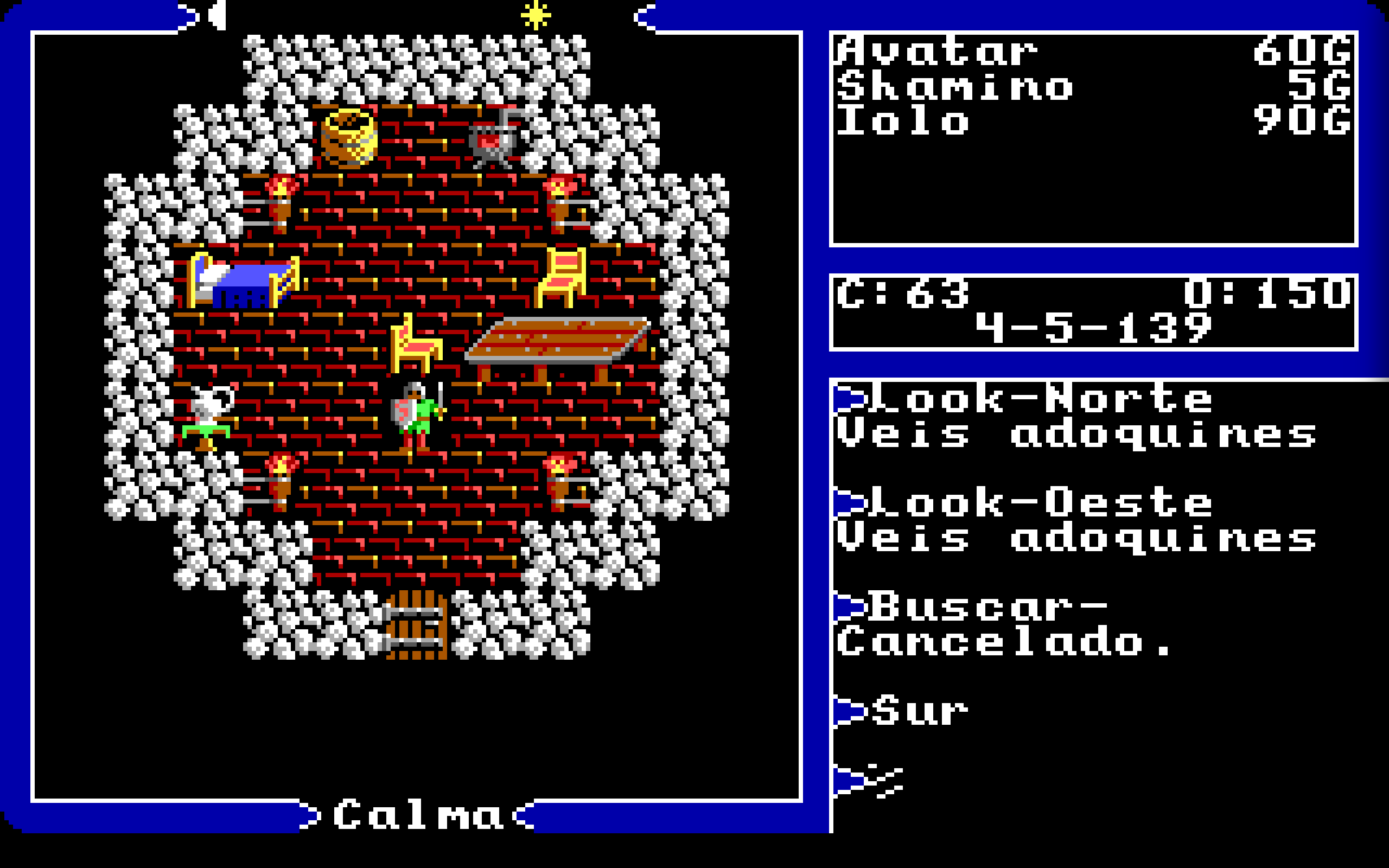 | 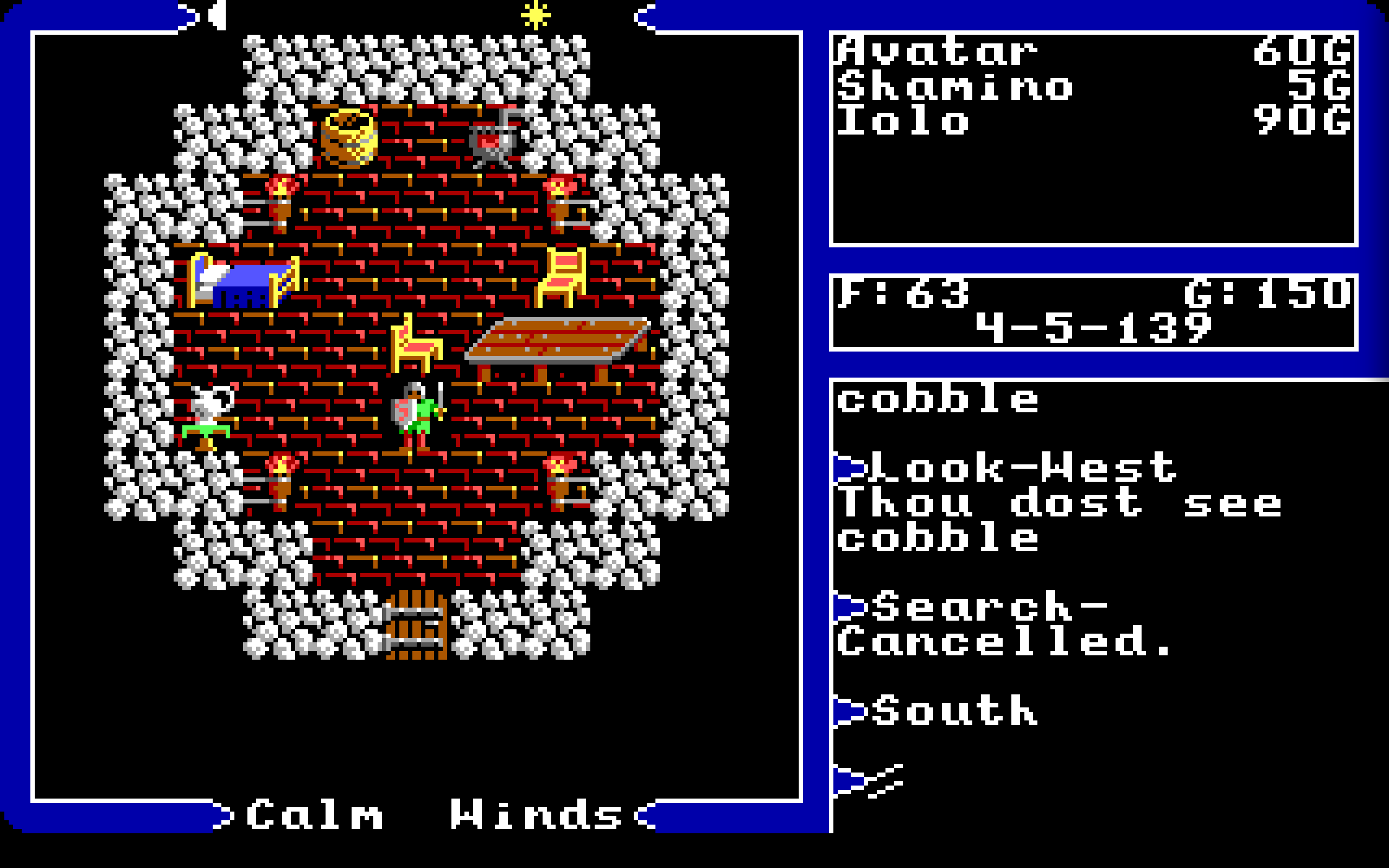 |
The model, which is what makes it safe
English is the floor of the replica, not "one more language": every piece of text comes byte-exact from the binary, and all the guards (pixeldiff, Grand Tour, approved-strings) are anchored against it. A language other than English is a parallel substitution table, keyed by the original English string, resolved at a single choke point (t()):
lang === 'en'⇒t()is strict identity. Not one call alters the output; the replica and the guards stay intact.lang !== 'en'⇒t(str)returnstable[str] ?? str. An incomplete language degrades to English string by string, which allows landing it in batches.
That last property is what makes translating a byte-for-byte replica not a risk: what is missing does not break, it shows in English.
Where the table lives, and why there
In src/i18n/ (versioned source), not in game/assets/. assets/ is material extracted from the binary and kept out of git; the language table is newly authored content and belongs under version control.
Status, measured on 2026-08-04
| Metric | Value |
|---|---|
Entries in es.json | 4 000 |
Marked as reviewed (reviewed: true) | 3 994 |
| Language quotes | « … » |
⚠️ Careful with the docstring. The header of i18n/index.ts still says "a SEED of 20 strings (
es.json) to test it end to end". That described the scope of phase F1 and today it is stale by two orders of magnitude. The 4 000 above are counted live from the file; the docstring is not.
There is a separate layer for the shell (menus, panels: authored text, not from the binary) with its own ts() function.
Trade-offs
- Skin names are not translated — they are proper nouns. Only the "Skin" prefix is.
- Sign bodies stay in Latin script by default even though DOS paints them in runes; see 1 · Image §8.
- Gaps remain. One, found while writing this document, is in §9.
7 · The scrollable log
✨ ADDED · Code: game/src/skin/fiel/skin.ts (ConsoleScrollback, consoleScrollLines, consoleScrollToLive)
Before
The original's console shows the last lines and nothing more. What scrolls off the top is gone: there is no way to re-read what an NPC said three turns ago.
Now
| Live console (lines 36-40) | History mode (lines 06-11) |
|---|---|
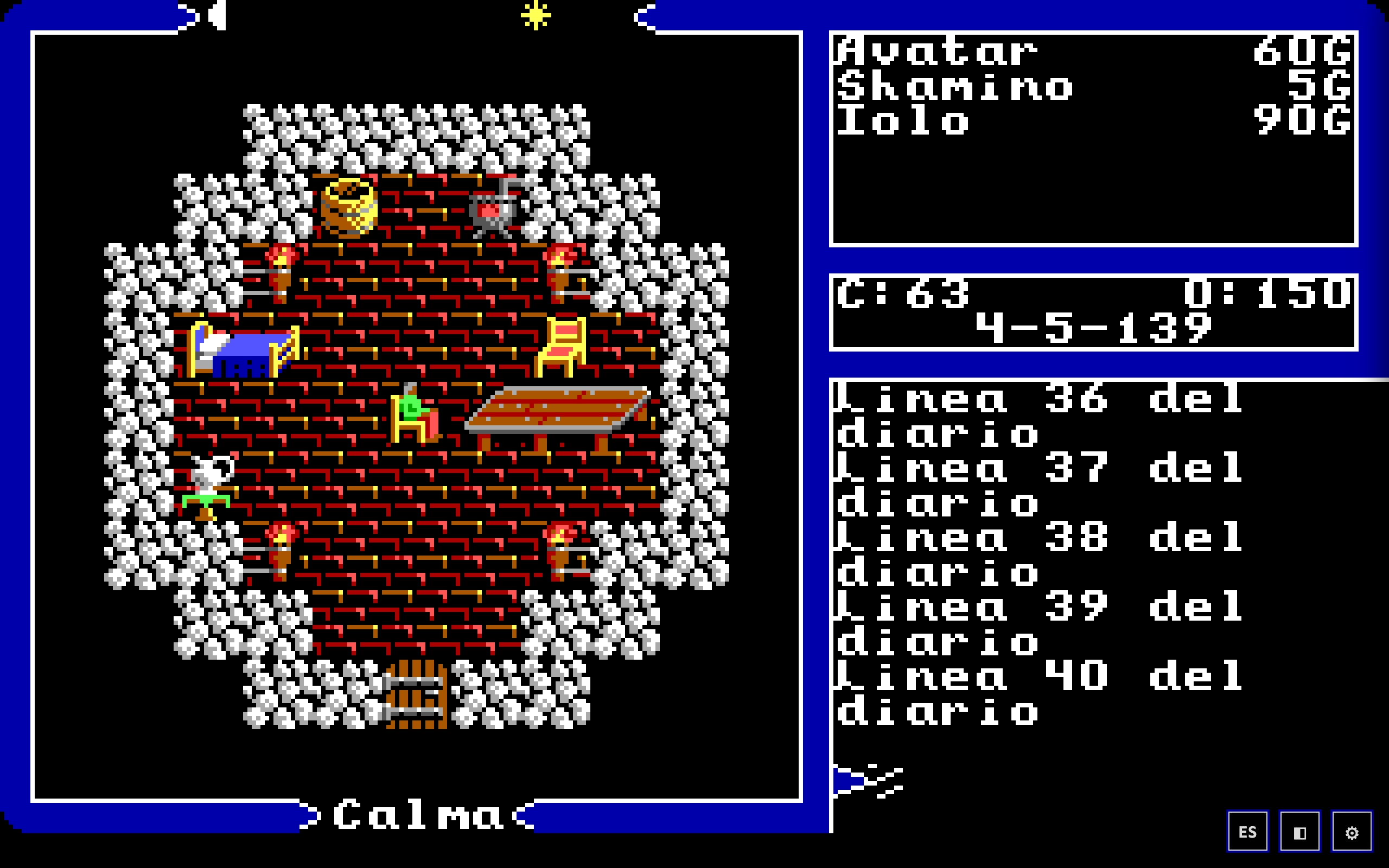 | 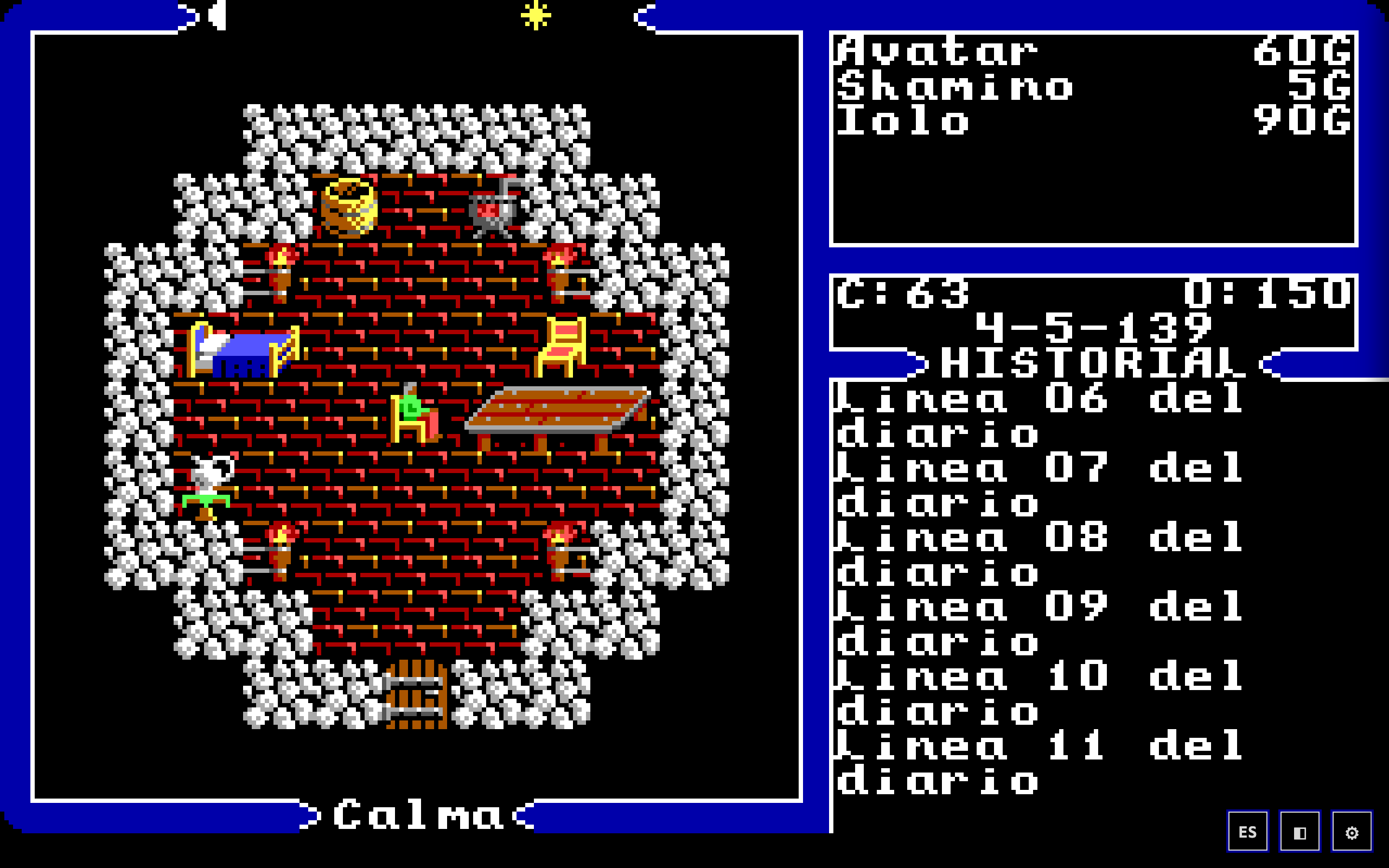 |
Wheel or drag over the console area and you enter history mode. Notice the band that appears in the chrome: >HISTORY<, with the same band brackets as the rest of the 1988 frame. It is not a modern scrollbar stuck on top; it is an indicator drawn in the skin's own language.
You leave by returning to the bottom or with any key: you never get stuck in the past while the game waits for a command.
The details that keep it out of the way
- Zoned, no collisions. The wheel over the console scrolls the history; over the panel with a Ztats list open, it scrolls the list; over the viewport, nothing (that is where tap-to-walk lives). Outside a list, the wheel over the panel is not even captured — the faithful skin stays untouched.
- Dragging "pulls the paper": downwards reveals the old, in both zones.
- The sub-line remainder accumulates. A slow drag is not lost:
restkeeps the fraction betweenpointermoves and only applies whole lines. - Byte-identical at rest. With
consoleScroll = 0the render is the same as always. The improvement costs not one pixel when it is not being used. - The shader skin forwards it. It does not reimplement it: it captures the events on its own canvas and calls
consoleScrollLineson the faithful skin it hosts.
Trade-off
The history belongs to the session, not the save: it is skin state, not GameState. Reloading the page loses it.
8 · What was REMOVED: the journal and the minimap
🗑️ REMOVED · 2026-07-26
This section is what makes the rest of the document honest. The port had two very convenient features and took them out on purpose:
| What | Key | Why it went |
|---|---|---|
| Journal (record of conversations) | F6 | The original has no journal on any key: getkey @0x1D5E maps F1..F10 to 0xC9..0xD2, which land in the dispatcher's "What?". It was a popup alien to the original UI. |
| Minimap (with fog of war) | Tab | The original only shows the map through (V)iew with the gem. The Tab panel gave away for free, and without the gem, what the original charges for. |
Both are an explicit ruling from the user, on the same day.
What was kept, and why
state.journalandstate.exploredstill exist, empty, for save-format compatibility: an old save still loads.defaultTileColorsurvived by moving to src/debug/tile-colors.ts — the QA drawer's map dump reuses it. The removal took the panel, not a useful function that turned out to have another consumer.
The lesson they leave
A port of this kind has two ways to improve the game, and they are opposites: adding what the original could not offer, and removing what robs it of its economy. The minimap was extremely convenient. It also turned an object the game makes you spend half the adventure on into decoration.
⚠️ Warning for anyone reading the internal shell census: it still lists the "Journal panel (ui/journal.ts, F6)" and the "Minimap panel (ui/minimap.ts, Tab)" as live shell components. Both files no longer exist, and there are no F6 or Tab keys. The census predates the removal and was not updated.
9 · A live defect found while writing this
It was not in the brief; it turned up while looking at the Spanish screenshot in §6.
Compare the first two console lines in Spanish:
>Look-Norte          ← «Look» IN ENGLISH
Veis adoquines
>Buscar-             ← «Search» translated
Cancelado.
The verb echo for (L)ook comes out untranslated while (S)earch is translated, and the direction ("Norte") is too.
The cause, verified in the table
"Look-"    → NO ENTRY     ⇒ t() falls back to English
"Look"     → "Mirar"      ⇒ exists, but is NOT the key that gets emitted
"Search-"  → "Buscar-"    ⇒ exists with the dash, which is why it works
The key emitted at runtime is the compound one, with a dash. The constant "Look" is there and the live "Look-" is missing. A one-line failure in the table, invisible to any coverage count that looks at the constants in the code rather than at what the console prints.
It has not been fixed here: this lane is documentation, and adding an entry to es.json touches the guarded corpus. It is reported.
10 · What was verified and how
The brief's five points were confirmed by reading the code, not inferred:
| Point | Verified in | Verdict |
|---|---|---|
| Touch controls | ui/touch.ts (tables counted live), deck-nativo.ts, tap-or-drag.ts | ✅ Correct |
| Tapping the map to walk | ui/autowalk.ts (A*, 140 ms, cancellations), intent emission in skin/fiel/skin.ts | ✅ Correct |
| Multiple save slots | core/persistence.ts (index + slots + autosave ×3), ui/savepanel.ts; and live: two slots created and listed | ✅ Correct — the docstring confirms the original had one SAVED.GAM |
| Spanish (i18n) | i18n/index.ts (model), es.json (4 000 entries counted today) | ✅ Correct |
| The scrollable log | skin/fiel/skin.ts (ConsoleScrollback + wheel and drag by zone); and live: A/B with 40 numbered lines | ✅ Correct |
Taken from a record and not re-verified: the dispatcher command census of §3 (source: movil-cmds-acta) — the ASM was not re-read here. What was counted today are the 25 entries of WORLD_BUTTONS, which is the result of the fix.
Three documented claims turned out to be stale and are flagged where they belong: the i18n docstring ("20 strings"), the shell census (journal and minimap listed as live), and that same census's claim that the shell looks vectorial.