
The references to source files and binary offsets you'll see here are the provenance of each claim: they say where it comes from. The engine is published under GPL-3.0-or-later at github.com/kokoima/openu5, so you can go and look them up one by one.
1 · Image improvements
Everything that changes what you see: the smoothing, the two skins and sprite and tile transparency.
The four entries in this document are ✨ ADDED: things the original did not do, each with its own switch. See the overview.
Contents
- The two skins: "1988" and "smooth" ✨
- The smoothing: xBR on the GPU ✨
- Transparency I — the body at alpha .55 ✨
- Transparency II — the outline cut-out ✨
What you can change yourself, and where
Almost everything this document describes can be switched while you play, no reload:
| Shortcut | What it does |
|---|---|
| F9 | Switches skin: toggles "1988" (exact pixels) and "smooth" (with xBR smoothing). That is §1 and §2. |
| F10 | Opens the SYSTEM menu: saves, video, audio and keys — the same door as the ⚙ button. |
| ⚙ (in the bar) | Settings: language, skin, sound and the rest of the preferences, without a keyboard. |
?transp=off | Added to the URL, leaves bodies opaque: the switch from §3 and §4. |
The skin starts on "smooth". The preference is stored in your browser, so your next visit honours whatever you last pressed.
1 · The two skins: "1988" and "smooth"
✨ ADDED · Code: game/src/skin/fiel/skin.ts, game/src/skin/shader/skin.ts, game/src/skin/manager.ts · Switched live with F9 or from ⚙ → Video.
Two presentations you can swap live: the faithful 1988 one, and a "smooth" one that hosts it and filters the viewport only.
Before
The original has a single presentation: 16-colour EGA, 320×200, fat pixels. There is nothing to choose.
Now
There are two skins, interchangeable at runtime, and one is a replica of the other:
- "1988 (faithful)" — the 1988 frontend rebuilt piece by piece from the binary: EGA chrome with literal coordinates (
paint_screen_frame@0x637e), an 11×11 viewport with the EGA tile pack, roster and console in theIBM.CHfont. - "smooth" (shader) — the same faithful skin with ONE pipeline change, not a reimplementation. It instantiates a
FaithfulSkinthat paints to a hidden 320×200 canvas, and composites each frame in two steps: the whole faithful frame is scaled by nearest neighbour (chrome and text byte-identical to the faithful skin), and only the viewport rectangle (176×176) goes through the edge filter.
Why it matters
That the shader hosts the faithful skin instead of duplicating it is the decision holding up everything else: the animation clock, the combat overlays, the moongate, the earthquake, the Ztats modal and the audio remain the faithful skin's. When a defect is fixed in the faithful skin, the shader inherits it without a line being touched. The 1988 replica never forks.
And filtering only the viewport is not laziness: text and chrome live outside that rectangle, so the filter cannot touch them. An upscaler run over the 8×8 font would have turned it to mush.
Trade-off
- The intro cinematic (ui/faithful-intro.ts) is a separate subsystem that runs and finishes before any skin is mounted: its plates do not go through the filter. It is declared as a boundary in the docstring of skin/shader/skin.ts.
- The overworld gem uses a separate DOM panel and is not filtered either; the dungeon gem, which the faithful skin does paint inside the viewport, is filtered. Two gems, two behaviours.
2 · The smoothing: xBR on the GPU
✨ ADDED · With the smooth skin (F9) · Code: game/src/skin/shader/xbr-gl.ts, upscaler.ts
The viewport goes through an xBR edge filter running on the GPU; the chrome and the text are still the 1988 ones.
Before
Nearest neighbour. One pixel of the original is an N×N square of screen pixels. It is what the "1988" skin does, and it is the right thing for it.
Now
The viewport goes through xBR level 1 with Hyllian's edge-detection rule (weighted difference by luminance rather than raw colour), ported to GLSL and run on WebGL1. The pipeline chains two 2× passes (= 4× internally) and leaves the 4→6 stretch to the bilinear blit.
Why it matters
An edge filter does not "blur": it reconstructs the diagonals that the 16-pixel grid could not represent. Measurement over the split layout gave 12.8× more distinct colours in the viewport than the faithful skin (2026-07-28) — the filter is working, not decorating.
Trade-offs, and there are several
- Licence: the kernel is the project's own port of extractor/src/upscale/xbr.ts, not the GPL
.glslfrom RetroArch that the spec recommended. The deviation is declared in the header ofxbr-gl.ts. - No WebGL, no filter: there is a
NearestUpscalerfallback that scales to 6× by nearest neighbour. The shader skin stays mounted and switchable, but it looks identical to the faithful one. It is a silent degradation: nothing warns the player. - What gets cut out loses the smoothing. Sprites recomposed from the EGA atlas (§3 and §4) are blitted with nearest, so the cut-out sprite does not carry xBR. It is recorded as an inherited caveat, not as a regression.
- Collapsed backbuffer if the host measures 0×0. Hosted inside another layout with no size, the shader computes
ceil(320/320) = 1and stays at 320×200: no smoothing, no error. Diagnosed and resolved later. It is the most treacherous failure mode of all, because the game works perfectly and the only thing wrong is the single reason anyone chose this skin.
3 · Transparency I — the body at alpha .55
✨ ADDED · Shader skin · Kill switch ?transp=off
The bodies of selected sprites are drawn at alpha .55 in the smooth skin, letting the floor underneath show through.
Before
Nothing in the port applied alpha < 1 to the body of a tile or an actor. Actors already had their black background cut out, but the body was solid: a ghost hid the floor just like a troll.
Now
A whitelist of families, chosen over an A/B mock-up rendered from the real atlas (A opaque, B at alpha .55, C with a glass tint — B is what got wired):
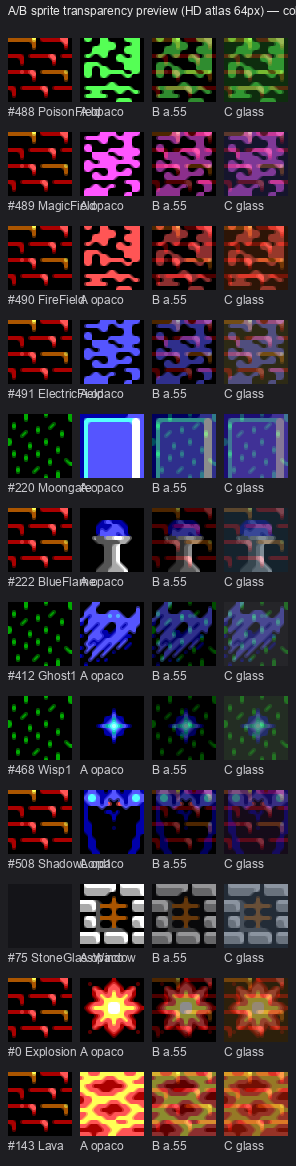
The three mock-up columns: A opaque, B at alpha .55, C with a glass tint. B is what got wired.
| Family | Tiles | Route |
|---|---|---|
| Force fields (Poison/Magic/Fire/Electric) | 488-491 | terrain: synthesised floor + body at .55 |
| Ghosts | 412-415 | actor: ActorTransparency.bodyAlpha |
| Wisps | 468-471 | actor |
| Shadowlords | 508-511 | actor |
And on top of those, the shadowlord boundary (112-127, as "mist") and the blue flame (222).
Why it matters
It is the canonical use of translucency: a ghost that looks solid is a ghost that is not frightening.
Trade-offs and rejections
- A whitelist by tileId, never global. An alpha applied to every actor would turn an orc translucent and break the readability of combat, and the wiring respects that.
- Before the fog, not after. Fields and flames live in interiors where the
fogCanvasalready modulates; an alpha applied afterwards would multiply with the fog and the sprite would vanish at night. The whole pass goes before. - Windows were rejected. Alpha .55 was tried on the window tiles (74/75) and the result only dims the stone: it reveals nothing (the background is black) and does not produce the "luminous glass" that was wanted. What was being sought — interior glow at night — is a glow, i.e. new design. The scaffolding was removed.
- Water is not treated, on purpose.
WaterStream(96-111) andCornerWithWater(228-231) are already composited by thewaterfn32layer; adding alpha on top would be double treatment and, worse, would reveal the void behind (a river has no floor beneath it). The waterfall (212-215) is indeed left uncovered, but its "dominant neighbour" is more waterfall or rock: the synthesised floor would come out wrong, so it stays outside the treatment. - A 16-colour floor: below roughly alpha .45 over dark terrain the tile becomes illegible. The .55 chosen sits just above that floor.
4 · Transparency II — the outline cut-out
✨ ADDED · Shader skin · Kill switch ?contourTransp=off · Code: game/src/render/floor-underlay.ts
The black outside the sprite is cut away and replaced by a synthesised floor; the black inside is kept, and a wall is never painted as floor.
This is the other treatment, and it is not the same as the previous one. Here the body's alpha is not lowered: the outer black pixels of the sprite are replaced by transparency (the ones connected to the cell edge, by flood fill), and the inner blacks are kept. The sprite stays opaque; what disappears is its background square.
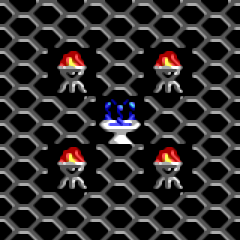
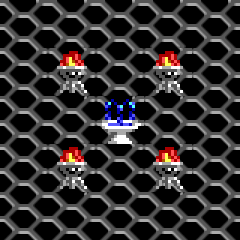
Before / after — the fountain in Lord British's castle
?contourTransp=off | default |
|---|---|
 |  |
On the left, the grid floor is cut off in black at the corners of the tile. On the right, the grid continues through the corners and only the water and the basin remain.
The synthesised floor
The fountain is baked by the faithful skin with no per-tile hook: there is nowhere to attach. The floor underneath is synthesised with dominantFloorNeighbor — of the four orthogonal neighbours, the floor tile that appears most, copying its already-rendered (xBR-exact) pixels before blitting the cut-out. And animated tiles (the fountain cycles four frames) are cut out using the same animation phase as the faithful skin (FaithfulSkin.animPhase): the fire moves and the edge does not flicker, with a guard in game/tests/contour-transp.test.ts requiring the four frames to stay different.
The rule "never a wall as background"
The "dominant neighbour" only ever chooses among real floors, and two rules guarantee it:
- Walls are not candidates for floor.
isFloorUnderlayCandidate: a candidate is floor if it is walkable on foot or navigable (grass, brick, wood, carpet, bridge, stairs, lava, water). Walls, dry stone, doors and windows are out. With three walls and one floor around, the floor wins: the walls do not even count. All walls ⇒null⇒ cell untouched. Never a wall as background. - Wall-mounted fires are not cut out. The left/right sconces (0xb0/0xb1) and the hearth (0xbc) already carry the wall in their graphic; cutting them out would paint brick behind. They keep their whole cell baked, and the faithful skin keeps supplying the flicker. Floor fires (brazier 0xb2, bonfire 0xb3, lamp post 0xbd, blue flame 0xde) are cut out. The ambiguous ones (0xbe candle on a table, 0xbf cooking fire) stay out on the same principle: the background must be what is actually behind.
Extension to the fires, which do not animate the same way
Braziers (0xb2), torches (0xb0/0xb1), bonfires (0xb3), hearths (0xbc–0xbf) and the blue flame (0xde) do not cycle their id: their flicker is procedural fn32 noise on a live canvas. The cut-out treats them differently — it synthesises the floor, and then cuts the live flame canvas by the tile's static silhouette (destination-in), so the flicker survives and the background is removed.
?contourTransp=off | default |
|---|---|
 |  |
What is NOT touched: its contribution to lighting (lightLevel / visMask). Only the painting. A presentation fix that had moved the lighting would have changed the game.
Trade-offs
- It is only legible over dense floors (brick, grating). Over grass or EGA desert — which are mostly black — the cut-out is invisible: the effect exists everywhere and shows in few places.
- The cut-out is blitted from the EGA atlas by nearest ⇒ the cut-out sprite loses the xBR smoothing. See §2, trade-off 3.
- The improvement is deliberately UNEVEN. Because of rule 2, two adjacent fires can look different: the floor brazier blends with the brick and the wall sconce keeps its baked square. It is the right choice — cutting out the wall fires too would paint brick where the player sees stone. When the real background is the wall, the correct answer is not to cut out.
What this document does not cover
- Fog, night occlusion and city shadows — they are painted by the faithful skin and are replica, not improvement.
- Pre-baked xBRZ water (
water-xbrz.png) — an existing layer, with no before/after to show. - The 3D dungeons and their decoration — they have their own document.
- The fidelity fixes (tiles, typography, lines and outlines, the zodiac) — those were defects of ours and they are fixed: they are the port's history, not an offer over 1988, so they are no longer listed here as "improvements".